Hostizzle.com menawarkan dua plan kepada pengguna yang mendaftar dengannya iaitu versi percuma dan berbayar..namun bagi Mr.Hac, plan percuma juga sudah cukup berbaloi untuk kita menggunakannya..100GB cukup tak? lihat screenshot di bawah:
Apa yang penting, kelajuannya sangat memuaskan..disamping ciri sekuriti yang mengkagumkan dan kosnya adalah serendah RM0! lihat apa yang diperkatakan oleh pembangun laman Hostizzle.com:
We are the only VPN provider charging $0 for a real OpenVPN connection. No waiting, no queues.
You want OpenVPN because many countries block PPTP, and because PPTP-based VPN is not secure. Our OpenVPN uses 1024-bit SSL/TLS certificates to sign you into the server, and Blowfish encryption to keep your internet use private.
Cara menggunakannya juga sangat mudah..sila ikuti tutorial berikut..
Cara Mendaftar dan Menggunakan Servis VPN Percuma Hostizzle.com:
1. Klik pada ‘INSTANT FREE VPN‘..masukkan alamat e-mel anda dan taip ‘yes‘ di bawah kotak soalan ‘Are you human? Type ‘yes’ if you are!’
2. Kemudian klik pada ‘Get your VPN CODES‘
3. Muat turun fail konfigurasi VPN Hostizzle.com
4. Muat turun OpenVPN Portable pada pautan di sebelah : OpenVPN Portable
5. Ekstrak OpenVPN Portable ke desktop anda..kemudian ektrak pula fail konfigurasi Hostizzle.com ke direktori OpenVPNPortable -> data -> config
6. Set-kan tetapan browser kepada ‘No proxy’ atau ‘Auto-detect proxy settings for this network’ (Mozilla Firefox)
7. Klik pada fail exe OpenVPNPortable dan klik ‘Connect’ (klik kanan dahulu pada ikon OpenVPNPortable yang berada di system tray kemudian baru klik Connect)..
8. Buka browser anda..jika berjaya melayari internet tanpa masalah,
periksa alamat IP anda di sini -> What Is My IP Address?
9. Jika ia sudah bertukar kepada alamat IP dari US, maka anda telah berjaya mengikuti tutorial ini..
10. Untuk memudahkan anda menukar dari satu proxy kepada proxy yang lain,
sila gunakan Add-on FoxyProxy (Mozilla Firefox)
Jika terdapat masalah, sila tutup kedua-duanya terlebih dahulu (OpenVPNPortable dan Firefox)..kemudian buka kembali dengan turutan 1. OpenVPNPortable -> 2. Firefox
Untuk penggunaan Hostizzle VPN ini, anda perlu perbaharui certificate setiap 30 hari (1 bulan)..kenapa kena perbaharui? tujuannya untuk membezakan antara pengguna percuma dan berbayar..kalau dua-dua sama buat apa ambil yang berbayar kan? anda boleh perbaharui certificate sebanyak mana yang anda mahu (Seumur hidup pun boleh) asalkan dibuat sekali sebulan..untuk perbaharui certificate, rujuk gambar di bawah:
Untuk entri akan datang, Mr.Hac akan berkongsi lagi servis VPN percuma yang terbaik untuk anda..
jangan lupa, bulan Jun sememangnya Mr.Hac dedikasikan tutorial untuk cara melepasi sekatan terhadap laman web dan juga cara melayari laman web secara anonymous (dengan lebih selamat tanpa dapat dipantau)..jika anda mahu entri hacking, tunggu bulan Julai nanti, ok? salam hormat dari Mr.Hac..
Selalu sangat Mr.Hac dapat soalan seperti berikut:
Kenapa perlu sembunyikan IP?
Kenapa perlu guna VPN?
Kenapa perlu guna SSH Tunneling?
Kenapa perlu guna Ultrasurf / proxy?
Kenapa perlu lindungi IP sedangkan kalau kita buat jenayah siber sekalipun, ISP tidak boleh mendedahkan maklumat IP melainkan diarah berbuat begitu oleh undang-undang??
Mr.Hac tak mahu jawab dengan artikel panjang berjela..cukup sekadar Mr.Hac berikan anda semua sebuah video untuk ditonton:
Secara kesimpulannya sila lihat perbezaan antara sambungan internet yang terdedah kepada ancaman, dan sambungan internet yang telah dienkrip oleh kaedah proxy, SSH atau VPN..
Sambungan Internet (tanpa enkripsi) -> ISP -> Laman web
Sambungan Internet (tanpa enkripsi-> Penggodam -> Laman Web
Sambungan Internet (beserta enkripsi) -> Penggodam yang hampa (KOH KOH KOH)-> Internet yang selamat!
Sambungan Internet (beserta enkripsi) -> firewall -> Internet yang bebas!
Sudah jelas sekarang perbezaannya?
lakukan perubahan sekarang dan mulalah melayari internet dengan cara yang lebih selamat dan bebas dari sekatan!
Ya..sememangnya anda tetap tidak akan selamat dari virus, RATs, mahupun keylogger tetapi itu semua bergantung kepada cara anda mengendalikan internet dan komputer..jika anda kurangkan diri anda dari bergantung kepada perisian crack dan juga jika anda lebih memahami apa itu virus, apa itu RAT, dan apa itu keylogger serta cara kerjanya, maka internet yang selamat dari ancaman adalah milik anda!
Elakkan KECURIAN IDENTITI, elakkan daripada apa yang anda layari di internet DILIHAT dan DIPELAJARI oleh orang lain, elakkan diri anda dari DIPANTAU oleh sesiapa sahaja!
Assalamualaikum semua..dah puas hati dengan entri-entri Mr.Hac sebelum ni mengenai cara melayari laman web yang disekat? ok..kali ni Mr.Hac nak berkongsi e-book yang pernah Mr.Hac beri dahulu iaitu E-Book Anonymous Surfing : Ciri Utama Seorang Penggodam..cuma kali ini, e-book Mr.Hac telah berubah wajah menjadi versi yang lebih interaktif!
(Boleh rujuk tutorial dalam Majalah PC bulan ini)
E-Book Hac telah menjadi lebih mudah dibaca apabila ia dalam bentuk ‘buku’ yang sebenar, yang boleh dibuka dari kanan ke kiri, cuma ia dalam versi e-buku yang tersimpan dalam komputer anda!
Nak tengok preview? anda boleh lihat dan baca contoh e-book Anonymous Surfing versi interaktif di bawah:
To view this flipping book you need to have Flash Player 9 or newer installed and JavaScript enabled. Flipsnack is a flash video player that allows you to create stylish flipping books out of your PDF document.Anda juga boleh klik butang sebelah SHARE untuk embed e-book ini pada blog anda
Apa komen anda tentang e-book Hac versi interaktif ini? adakah ia lebih menarik dibaca? Jika anda sukakannya, sila sebarkan ia dalam blog anda, dan juga berikan ia kepada rakan-rakan anda! semoga anda memperoleh manfaat darinya..
SSH vs VPN :Kenapa bukan DNS? Kenapa bukan proxy??
Entri ini ialah rumusan, kesimpulan, atau konklusi dari entri-entri Mr.Hac yang sebelumnya mengenai Secure Shell (SSH) Tunneling dan Virtual Private Network (VPN)..antara anonimiti dan keselamatan, antara kebebasan berinternet dan privasi, dan juga antara niat dan tujuan, 2 kaedah berbeza ini telah mencapai satu konklusi yang konkrit (perghhh..)
Beberapa pelawat/pembaca yang datang singgah ke blog ini bertanyakan soalan itu kepada Mr.Hac..jawapannya mudah sahaja..anda yang baru membaca blog ini, dan terus bertanyakan soalan seperti itu, Mr.Hac anggarkan anda tidak bekerja lagi, atau mungkin bekerja tetapi bukan di syarikat korporat/sektor kerajaan, dan boleh jadi anda telah disekat oleh Penyedia Servis Internet (ISP) iaitu STREAMIX, dan lain-lain ISP lagi dari melayari 10 laman perkongsian fail yang telah diarahkan oleh SKMM..jadi Mr.Hac yakin dan pasti anda hanya disekat oleh firewall atau sistem/perisian sekatan yang kurang fungsinya, dan boleh juga dikatakan lemah..anda pastinya tidak pernah lagi disekat oleh firewall yang digunakan oleh syarikat-syarikat korporat, contohnya Websense, Sonic Wall, tak lupa juga Barracuda..
Disebabkan itu Mr.Hac TIDAK menulis tutorial menggunakan DNS ataupun Proxy, cuma yang ada Proxy-Based Software iaitu Ultrasurf..ini adalah kerana DNS dan Proxy tidak mampu melepasi sekatan internet yang dibuat oleh perisian sekatan/firewall itu tadi..Mr.Hac harap anda lebih jelas dengan matlamat Mr.Hac supaya anda semua dapat melayari laman web yang disekat dengan tutorial yang lebih berhasil dan mantap berbanding menggunakan DNS atau Proxy yang ternyata sesuai untuk firewall yang lemah, dan juga lebih sesuai untuk golongan pemula..jadi sesiapa yang telah membaca entri ini Mr.Hac harap anda tolong jangan tanya lagi apa kegunaan DNS, Proxy, SSH Tunneling, mahupun VPN..Hac akui tutorial yang ditulis agak TEKNIKAL dan perlukan pemahaman yang bukan tinggi, juga usaha untuk memahaminya bukan sedikit, tetapi jika ada kesungguhan, Hac pasti anda boleh melakukannya!
Berikut adalah pertikan dari beberapa laman web mengenai perbezaan antara SSH dan VPN:
SSH: Secure Shell is a program for logging into a remote machine and for executing commands on a remote machine. It is intended to replace telnet, ftp (fetch), rlogin and rsh, and provide secure encrypted communications between two untrusted hosts over an insecure network. (from the openbsd man page).
SSH encrypts all traffic (including passwords) to effectively eliminate eavesdropping, connection hijacking, and other network-level attacks. Additionally, SSH provides a myriad of secure tunnelling capabilities, as well as a variety of authentication methods. (from the openssh front page.)
VPN: Virtual Private Network. A private network that is configured within (or to travel across) a public network in order to protect data or for other reasons. In this case, the University of Minnesota built a VPN to allow high-speed internet access users (DSL and cablemodem users) access to U. resources from their homes, like those who use the modem pool have.
The VPN will encrypt data sent from home until it gets to the VPN server on campus, but after that, the data is unencrypted as it passes over the local U. network.
SSH (Secure Shell)
SSH was designed as a secure (encrypted) way to log into a remote system.
SSH secures shell logins and specific ports on a one-to-one basis.
SSH has been extended over the years to support additional services such as scp (secure copy) and sftp (secure ftp) which basically encrypt the cp or ftp connection in an ssh session.
SSH works at the port level and can secure individual connections.
SSH runs at what’s called the application layer. This means that it works on a specific port (typically 22) using defined protocols for communication and is an end-to-end solution (i.e. one machine connected to port 22 on another machine).
VPN (Virtual Private Network)
VPN connects networks rather than individual hosts.
VPN establishes one connection that securely tunnel traffic to an entire network (one connection to a server, provides access to the entire network resources).
VPN works at the transport layer. This means it handles ALL communication between two points on the network. It doesn’t care about what kind of traffic you’re handling (http, ftp, ping, nfs, dns, and yes, even ssh).
VPN has no concept of what any of the higher-level protocols actually do. It just knows that it encrypts this packet, sends it on its way and decrypts it at the other end. Therefore even if you had a VPN tunnel established between two points, you still need to use ssh to open a shell on the remote machine, or use a web browser to access a web site, or use an ftp client to up/download files. The difference is that the VPN adds a layer of security to otherwise non (or, at least, less) secure protocols.
Beza yang jelas antara keduanya:
Security
Hands down, in the general scheme of things, I would say VPN has this area won. While SSH does in fact have a high security standard, the way VPN handles encryption is more intelligent. This is pretty much all because of VPN’s encapsulation method (which will be covered again later) that adds an additional security measure that SSH doesn’t.
For those who aren’t familiar with encapsulation, especially with VPN, here’s a general overview. When you connect through a VPN tunnel, the TCP/IP packets have more overhead. This is due in part to the VPN service placing an encryption header on top of the packet itself. While this does slow down traffic (which will be covered later as well), companies have gotten wise to this technology and added measures to make sure this cannot be tampered with. This is generally done with a token (such as a 6-digit RSA SecurID) which authenticates the user, instead of using (just) a username and password.
In the realm of SSH, the protocol it uses is pretty intensive when it comes to security. The fundamental flaw to this, though, is when a key isn’t used. In previous articles I gave a step-by-step guide on how to set this up, and there’s a major reason for this. When you log in via SSH without using a key, your log in information is sent via plain text. Now, if you’re only connecting to a home computer that’s setting right next to you, it’s almost never an issue. But, say you’re at work and you want to check the iostats on the server, sending your data via plain text would not be the logical choice. That’s basically telling everyone to log into your server. VPN doesn’t have this issue, as the encapsulation header doesn’t contain anything damaging to the user itself, as all the data is inside the packet underneath the encapsulation header.
Speed
This is the one that gets to me the most here. For anyone that’s used both protocols, I’m sure they will agree that SSH is the faster of the two. Fortunately, the reason is simple.
In the last point, I talked about how VPN has that encapsulation header to provide an additional layer of security. While it adds that extra sense, it comes at a great price. With VPN, what happens is (not necessarily like this but the basic idea is there), the packet payload is segregated (as a TCP/IP packet length can only be 1500 bytes). This means that less data reaches the destination, requiring more packets to be sent, increasing bandwidth. Once the encapsulation header has been added to the packet, and reaches the destination, the destination then has to remove the header to get the payload from the packet. So, basically, a website that generally takes about 5 seconds to load (for example), can take 10-15 seconds (if you’re lucky).
SSH, however, plays nicely with the data. With or without a key, packets don’t take as long to get from A to B. There is no overhead (i.e.: extra headers) to deal with when it comes to SSH, and while there is a slight speed performance hit, even when using SSH as a proxy that same page can take only 2 seconds longer to load.
Ease of Use
For the administrator setting up the service, this sort of depends. Since most Linux flavors have at least 1 VPN solution in their repos, and I have yet to run into one that doesn’t have an SSH server/client in them, it’s pretty easy for the administrator to just run a single command to install it all. This category, though, is really intended for the users the administrator will have to support with said software.
When I worked on the Ford help desk, I got a lot of calls every day asking for help on how to get VPN to work. While the calls were easy, there was never an easy “click here to solve it all” button we could push. Granted, most of the time it dealt with either a transport/tunneling issue, or sometimes even a port issue, there was a lot more calls than we should’ve received from it. Then there was also the problem of the previously-mentioned SecurIDs desynching. Again, a very easy fix, but it seemed if it wasn’t one thing it was another. I can’t fault the user though, completely, as the e-mail documentation (read: a couple of paragraphs) didn’t go into any detail what-so-ever to assist the user.
SSH, while I never really dealt with it in the same manner as VPN, is a lot easier to use. The thing is, using a key makes the task even easier. Unfortunately there’s not a lot to really say here, as it also depends on how you use SSH (i.e.: PuTTy, OpenSSH client, another SSH client, etc…), but it all pretty much amounts to the same result. It’s all relatively easy to set up, and the administrator can simply pass out a config file (like a script file for Linux) to make the task even easier if it uses a generic key.
Configuration
Every server is different, which makes this category a bit hard to judge. However, in general SSH is easier to manage, especially when you have a big network. The reason why I say this is because, at least OpenSSH, uses one, maybe two configuration files you have to modify generally. Probably the hardest task is setting it up to use keys instead of password authentication. VPN does make this task easier, though, by offering an online configuration (at least OpenVPN does). Which in the end does make configuration even easier, while you only have to worry about the network configuration (i.e.: making sure VPN access from outside is possible).
Conclusion
When it comes down to it, I personally prefer SSH. VPN would be great if I was running a medium or large network, and/or was super paranoid. However, SSH with key-authentication satisfies my necessities just fine. Basically, if you’re using VPN, know that it might (probably will) need extra configuration compared to it’s sibling, but adds a hefty amount of extra security SSH doesn’t (at a price). If you prefer, you could also set up both, and use VPN when it’s not time-critical, while SSH is used for those moments where you’re against the clock.
VpnSurfing.com, satu blog yang buat Mr.Hac teruja kerana blog ini menceritakan segalanya tentang servis serta perisian VPN percuma beserta tutorial penggunaannya sekali..
Walaupun dari segi rekabentuknya tampak janggal dengan ‘pandangan’ yang sederhana, tetapi isi kandungannya mantap dengan pengisian mengenai servis VPN percuma..biarpun tidak menerangkan secara terperinci akan apa itu VPN, tetapi sudah lebih dari cukup jika anda dapat mengetahui banyak ‘koleksi’ servis VPN percuma yang ada di dunia maya ini..
Selain dari pengisian entri servis dan akaun VPN percuma, anda juga dapat lihat beberapa bahagian yang menarik contohnya:
Anda boleh memuat turun aplikasi sambungan servis VPN yang ringkas,
dan mudah difahami serta digunakan di sini -> vpnsurfing.com.pbk
Sila klik kanan pada pautan yang diberikan, dan simpan fail sebagai vpnsurfing.com.pbk (Rujuk screenshot)
Benarkah ura-ura mengatakan akan ada serangan Anonymous Hackers yang kedua??
jom kita tonton video di bawah dahulu:
Gambar Op Malaysia 2
Allow me first to apologize for this interruption. I do, like many of you, appreciate the comforts of every day routine the security of the familiar, the tranquility of repetition. I enjoy them as much as any bloke. But in the spirit of commemoration, whereby those important events of the past usually associated with someone’s death or the end of some awful bloody struggle are celebrated with a nice holiday. I thought we could mark this day sixteenth of june, a day that is sadly no longer remembered, by taking some time out of our daily lives to sit down and have a little chat. There are of course those who do not want us to speak. I suspect even now, orders are being shouted into telephones, and men with guns will soon be on their way. Why? Because while the truncheon may be used in lieu of conversation, words will always retain their power. Words offer the means to meaning, and for those who will listen, the enunciation of truth. And the truth is, there is something terribly wrong with this country, isn’t there? Cruelty and injustice, intolerance and oppression. And where once you had the freedom to object, think, and speak as you saw fit, you now have censors and systems of surveillance coercing your conformity and soliciting your submission. How did this happen? Who’s to blame? Well, certainly there are those more responsible than others, and they will be held accountable, but again truth be told, if you’re looking for the guilty, you need only look into a mirror. I know why you did it. I know you were afraid. Who wouldn’t be? War, terror, disease. There were a myriad of problems which conspired to corrupt your reason and rob you of your common sense. Fear got the best of you, and in your panic you turned to the now Prime Minister. He promised you order, he promised you peace, and all he demanded in return was your silent, obedient consent.
We have seen the censorship taken by the Malaysian government, blocking sites like The Pirate Bay, and WikiLeaks. Malaysia is one of the world’s strictest governments, even blocking out movies, and television shows. These acts of censorship are inexcusable. You are taking away a basic human right. The internet is here for freedom, without fear of government interference. Do not think that no one else notices. Your structured government has done the talking, and we hear loud and clear. Let this be an announcement to all your people. This is a sign, a warning, and an opportunity to listen to ideas above your own. In a way you are being stubborn. But how will this help anyone or your country. We fear that if you make further decisions to take away human freedom. We are obligated to act fast and have no mercy. For rules were meant to be broken. And corruption was meant to be washed away and forgiven. Now we will wash your corruption away so be prepared. Take this as a favor.
We shall bring down the entire countries national infrastructure. We shall make this a day to be remembered.
This is your second warning.
We are Anonymous.
We are Legion.
We do not forgive.
We do not forget.
Expect Us.
Betulkah anonymous akan melancarkan Operation Malaysia 2 atau Op Malaysia kedua. Benar atau tidak Hackers anonymous ini menghantar mesej tentang serangan Operation Malaysia 2 atau Op Malaysia 2 atau gelombang kedua. Serangan hackers sebelum ini, jelas menjejaskan hampir 200 laman web kerajaan, blog, portal dan forum tak terkecuali juga twitter serta facebook pun kena hack. Samada ia palsu atau benar langkah keselamatan perlu diambil.
Serangan kali kedua ini dirancang akan dilakukan pada 9.30mlm, 4 julai 2011 dan mensasarkan laman web kerajaan Malaysia iaitu PMO.gov.my. Samada benar atau portal atau laman web PMO.gov.my akan kenahack kita tengok mesej video Hackers anonymous ini yang diedarkan melalui youtube.
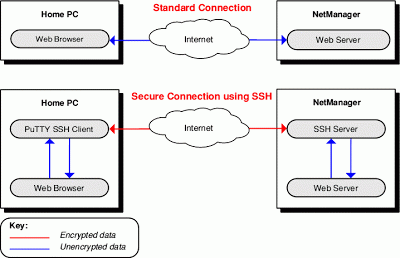
Secure Shell (SSH), adalah protokol yang mengenkrip komunikasi antara komputer anda dan pelayan (server)..Enkripsi ini menghalang komunikasi dari dilihat atau diubah oleh pengendali rangkaian..SSH boleh digunakan untuk pelbagai aplikasi untuk melindungi data..SSH adalah alternatif yang terbaik untuk VPN..
SSH adalah amat berguna untuk melepasi sekatan terhadap internet kerana ia mencipta satu ‘terowong’ (tunnel) yang dienkrip sepenuhnya. Perisian Penapis Internet atau firewall mungkin ‘keberatan’ untuk menyekat sambungan SSH sepenuhnya kerana ia juga digunakan untuk pelbagai tujuan selain daripada melepasi sekatan, sebagai contoh, ia digunakan oleh pentadbir sistem untuk mentadbir server mereka di Internet..(kebiasaannya port yang digunakan ialah port 22 dan 443, di mana masing-masing ialah port yang biasa digunakan untuk tujuan yang ‘selamat’..sila rujuk List of TCP and UDP port numbers)
Jika anda ingin menggunakan SSH, anda memerlukan akaun pada mesin server, umumnya pelayan Unix atau Linux. Untuk melepasi sekatan firewall, server perlu mempunyai akses internet tanpa had (tanpa sekatan terhadap kebebasan internet) dan mempunyai kredibiliti yang dipercayai..
Assalamualaikum..apa kabo anda semua? dah ready nak kutip ilmu baru lagi hari ni?
untuk bulan Jun ni, rasanya nak dekat 10 entry semua Mr.Hac duk cerita pasal bypass internet restriction (melepasi sekatan internet)..buat mereka yang baru follow blog ni, Hac harap anda terjah semua entry-entry lama yang berkaitan supaya tidak ketinggalan..Hac tak nak berikan anda pautan (link)..anda perlu cari sendiri, baru tahu tinggi darjat ilmu itu..
Intro : Apa Itu VPN?
VPN ialah singkatan dari perkataan Virtual Private Network..menurut wikipedia, VPN ditafsirkan sebagai:
A virtual private network (VPN) is a secure way of connecting to a private Local Area Network at a remote location, using the Internet or any unsecure public network to transport the network data packets privately, using encryption. The VPN uses authentication to deny access to unauthorized users, and encryption to prevent unauthorized users from reading the private network packets. The VPN can be used to send any kind of network traffic securely, including voice, video or data.
VPNs are frequently used by remote workers or companies with remote offices to share private data and network resources. VPNs may also allow users to bypass regional internet restrictions such as firewalls, and web filtering, by “tunneling” the network connection to a different region.
Technically, the VPN protocol encapsulates network data transfers using a secure cryptographic method between two or more networked devices which are not on the same private network, to keep the data private as it passes through the connecting nodes of a local or wide area network.
Kata mudahnya, segala data anda yang dihubungkan melalui internet ke satu destinasi yang lain dienkrip oleh sambungan VPN, dan data tersebut tidak dapat dibaca, dicuri, atau digodam..IP asal anda juga akan disembunyikan, dan hanya IP dari pelayan/penyedia servis VPN sahaja yang akan ‘kelihatan’..sambungan VPN dapat membantu anda melindungi data dan diri dari penggodam, dan juga dapat membantu anda melepasi sekatan internet melalui firewall..
Servis VPN Percuma : Free OpenVPN Service
Terdapat banyak servis dan perisian VPN percuma..kali ini Hac nak memperkenalkan kepada anda satu servis VPN percuma yang berbaloi untuk dicuba, iaitu Free OpenVPN..Freeopenvpn adalah pakar dalam servis VPN sejak beberapa tahun yang lalu, dan servis yag disediakan sememangnya berkualiti tinggi..pengguna tidak perlu membayar apa-apa kerana servis yang ditawarkan sememangnya percuma 100% (mereka disokong oleh sumbangan derma dan iklan)..bukan apa..banyak servis VPN yang mendakwa servis mereka percuma 100% tetapi…hanya muslihat semata-mata..kelajuan yang diberikan sangat lambat/lembab sehingga memaksa pengguna melanggan akaun premium untuk mendapatkan kelajuan yang lebih atau menghilangkan iklan yang kelihatan pada pelayar web..
2. Ekstrak fail OpenVPN POrtable..(ektrak ke Desktop kalau nak senang
anda akan mendapati satu folder baru tercipta di desktop: OpenVPNPortable
3. Muat turun fail konfigurasi Free OpenVPN di sini : freeopenvpn.zip
4. Ekstrak kesemua fail konfigurasi tersebut dalam folder OpenVPNPortable -> data -> config
5. Dalam folder OpenVPNPortable terdapat satu fail exe dengan nama yang sama..klik pada fail OpenVPNPortable itu..jika ada tetingkap yang meminta anda untuk menjalankan program atau tidak, hanya klik ‘continue’..tetingkap seperti di bawah akan muncul setelah pemasangan sambungan VPN berjaya dilakukan pada PC anda..
6. anda akan dapati terdapat satu icon pada dulang sistem (system tray)..klik ‘Connect’..
7. Sila set-kan tetapan proksi pada pelayar web anda kepada ‘Auto-detect proxy settings for this network’ (Firefox)..jika anda memakai pelayar web yang lain, sila tetapkan pada tetapan yang sama fungsinya (lihat screenshot)..
8. Setelah sambungan telah berjaya, anda boleh cuba melayari mana-mana laman web yang disekat..
jika anda di bawa ke laman ‘freeopenvpn’, klik pada ‘Free VPN Service’..
untuk menguji sambungan anda telah berjaya atau tidak, pergi ke laman What Is My IP Address? dan semak alamat IP anda..
9. Berikut adalah screenshot alamat IP yang diberikan:
Screenshot 1
Screenshot 2
9. Aii..tunggu lagi? cuba la sekarang dan berikan pendapat anda!
Salam hormat dari Hac..(yang penting boleh layan HULU.COM! hahaha!)
P/S: SILA AMBIL PERHATIAN pada pesanan dari laman pembangun servis OpenVPN ini:
Notes about our Free SSL VPN service
To make sure everyone has same priority to use our free VPN service, the VPN connection session will be reset every 8 hours. Each time after OpenVPN VPN connection is established, users need access our web site http://www.freeopenvpn.com for one time to activate the Free SSL VPN session. So please bookmark this page and visit back every time you need use our free openvpn service in your computers or mobile phones.
Bookmark This Page Now
We guarantee maximum 1200Kbit/s download bandwidth and 800Kbit/s upload bandwidth for each free VPN session – suppose you have enough bandwidth from local ISP side;
To maintain high quality of VPN service, no P2P and Bit Torrent traffic is allowed;
Sekarang Hac sedang menaip entry seterusnya..so sekarang layan gambar je la eh?
Tak sangka boleh kekalkan trafik 1000++..
Boleh tengok kat situ, apesal.com menjadi antara referral trafik yang terbanyak..cuma yang dapat buat Hac bangga bila google.com menjadi penyumbang terbanyak..maknanya orang dah mula ‘jumpa’ blog ni dari google..
Alhamdulillah..tak tahu la berapa lama rank ni boleh kekal (ye la, bergantung kepada trafik)..tapi harap-harapnya boleh kekal bawah 1000 dah cukup bagus..
Yang pasti terima kasih kepada anda semua yang sentiasa menyokong My Hackers Are Here!
P/S: buat masa ni apesal.com sedang down..kena sabar sikit la..bagi yang nak mendaftar, kena tunggu apesal ok balik..
Assalamualaikum semua..Hac harap semua yang datang baca blog ni sihat-sihat la ye..
Ok..bagi yang belum baca lagi Tutorial SSH Tunneling versi yang pertama, anda bolehlah pergi baca sekarang di sini —> Tutorial SSH Tunneling
Sebenarnya versi kedua ini tidak jauh berbeza dengan versi pertama..cuma versi ini lebih mudah dan tidak memerlukan anda untuk mendaftarkan akaun shell, kerana ia telah disediakan..jika anda nak gunakan akaun anda dari shellmix.com pun boleh!
Anda boleh ikut tutorial pada screenshot yang diberikan..atau jika nak Mr.Hac terangkan, kata mudahnya: IKUT MANA-MANA BUTIR AKAUN SHELL DI BAWAH
Bandingkan dengan screenshot dari perisian MyEnTunnel yang Mr.Hac dah tunjukkan di atas, dan isikan butir-butir akaun shell mengikut panduan dari screenshot Mr.Hac tu..mudah bukan?
Jika anda ingin tahu lebih lanjut mengenai SSH Tunneling dan akaun shell percuma, sila layari pautan di bawah:
Berikut adalah CONTOH screenshot yang Mr.Hac ambil setelah alamat IP bertukar apabila sambungan SSH Tunnel berjaya dilakukan (connection establish/stable):
Screenshot 1
Screenshot 2
Kelebihan SSH Tunneling Berbanding perisian/pelayan proksi:
Jika anda mahu membandingkan dengan perisian/pelayan proksi seperti Ultrasurf dan TOR, sambungan internet yang dibuat melalui kaedah SSH Tunneling memberikan anda lebih privasi, lebih kukuh keselamatannya dan segala apa yang anda lakukan ketika dalam talian tidak akan dapat dikesan oleh sesiapa..ia setanding dengan sambungan yang dibuat oleh perisian/pelayan Virtual Private Network (VPN)..dan bab kelajuan juga agak mengkagumkan..setakat yang Mr.Hac cuba, tiada satu kali pun sambungan yang terasa lembab atau mengecewakan..jika anda mahu cuba menganalisis sambungan yang dibuat oleh SSH Tunneling, anda boleh gunakan perisian Wireshark..
Kekurangan SSH Tunneling:
Beberapa perisian yang menggunakan proksi http tidak menyokong proksi socks contohnya IDM..dan anda perlu membuat beberapa langkah lagi untuk menjadikan ia menyokong sambungan proksi socks SSH Tunneling..itu sahaja kekurangan yang Mr.Hac nampak..yang lain? terbaik!!
Sedikit Tips Tambahan:
MyEnTunnel..apa yang menarik? apa yang menarik ialah ia boleh ‘disimpan’ atau disorokkan pada dulang sistem (system tray) dan ini adalah satu kelebihan berbanding sambungan SSH menggunakan putty, kerana putty hanya boleh di-minimize, tetapi ia tidak masuk ke dalam system tray..jadi bos anda atau encik ICT admin (contohnya laaa) masih boleh mengesan perbuatan anda..tetapi dengan MyEnTunnel, sekurang-kurangnya mereka tidak akan perasan kewujudannya selepas disorok dalam system tray..
dan jangan lupa untuk SIMPAN TETAPAN ANDA dengan menekan butang SAVE!
Screenshot di bawah pula adalah panduan kepada anda ketika MyEnTunnel berada pada system tray:
SOCKS PORT : 443 atau 22 atau 7777 SSH PORT : Ikut nombor sebelah alamat IP seperti screenshot akaun shell yang ditunjukkan di atas (contohnya IP Address: *** ** *** * – Port 5000 <- ambil Port ini)
CONTOH SETTING BROWSER :
Apa lagi? Mr.Hac dah memudahkan langkah anda..silakan mencuba SSH Tunneling sekarang..mudah aje kan? happy surfing fellas! (boleh juga bypass sekatan HULU.COM!)
Pembetulan ralat pada gambar: Sila pilih SOCKS v4 untuk kelajuan maksima!
(This entry is tribute to Janjang..thanks bro for the link and for the test!)







 To view this flipping book you need to have Flash Player 9 or newer installed and JavaScript enabled. Flipsnack is a